GSTR-1 Report
How to generate, read, and export the GSTR-1 outward supplies report
GSTR-1 Report
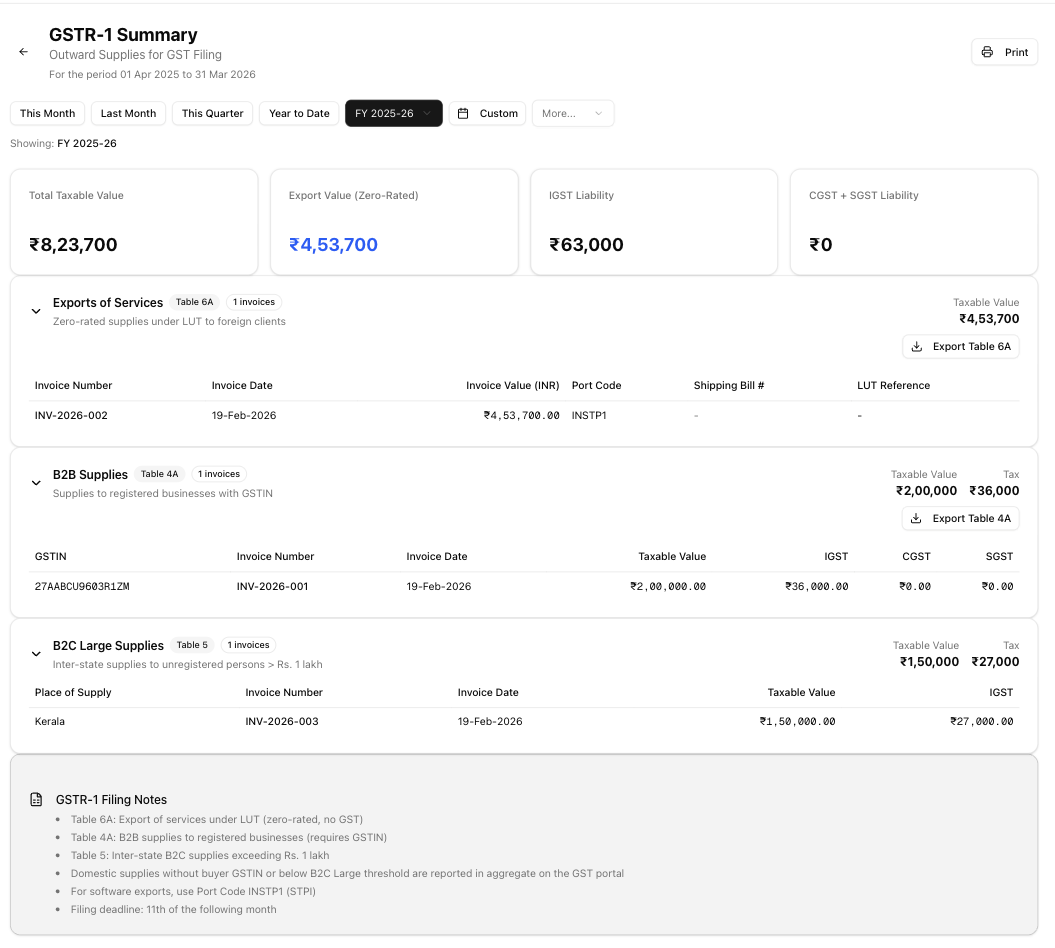
GSTR-1 is the monthly return of outward supplies that every registered GST taxpayer must file. The app pulls data from your invoices, classifies each one into the correct GSTR-1 table, and presents a ready-to-review summary. You still file the actual return on the GST portal — this report gives you the organised data you need to do that quickly and accurately.
How to Generate
Open Reports in the sidebar, then navigate to GST Reports → GSTR-1. Use the date-range picker to set the return period. The report generates automatically once a range is selected — there is no separate "Generate" button.
Report Header
The header displays:
- Title — "GSTR-1 Summary"
- Subtitle — "Outward Supplies for GST Filing"
- Period label — "For the period DD MMM YYYY to DD MMM YYYY"
- Back arrow — returns to the Reports hub
- Print — prints the full on-screen report (no header-level Excel or CSV export)
Summary Cards
Four cards appear at the top of the report:
| Card | What it shows |
|---|---|
| Total Taxable Value | Combined taxable value across all tables |
| Export Value (Zero-Rated) | Taxable value from Table 6A exports (displayed in blue) |
| IGST Liability | IGST from B2B inter-state supplies and B2C Large |
| CGST + SGST Liability | CGST and SGST from B2B intra-state supplies |
Table 6A — Exports of Services
Zero-rated supplies under LUT to foreign clients. This section is expanded by default.
| Column | Description |
|---|---|
| Invoice Number | Your export invoice number |
| Invoice Date | Date of invoice |
| Invoice Value (INR) | INR value of the supply |
| Port Code | Always INSTP1 (STPI port code for software exports) |
| Shipping Bill # | Shows a dash — not applicable to software service exports |
| LUT Reference | Your Letter of Undertaking reference, if recorded |
Classification rule: invoice_type is export.
Export: Click Export Table 6A to download GSTR1_Table6A_<MMMyyyy>.csv (requires reports.export permission).
Table 4A — B2B Supplies
Supplies to registered businesses that have a GSTIN.
| Column | Description |
|---|---|
| GSTIN | Buyer's GST Identification Number |
| Invoice Number | Invoice number |
| Invoice Date | Date of invoice |
| Taxable Value | Taxable amount in INR |
| IGST | Integrated GST (inter-state supplies) |
| CGST | Central GST (intra-state supplies) |
| SGST | State GST (intra-state supplies) |
Classification rule: invoice_type is domestic_intra or domestic_inter, and the invoice has a client_gstin.
Export: Click Export Table 4A to download GSTR1_B2B_<MMMyyyy>.csv (requires reports.export permission).
Table 5 — B2C Large Supplies
Inter-state supplies to unregistered persons (no GSTIN) exceeding Rs. 1 lakh.
| Column | Description |
|---|---|
| Place of Supply | State name derived from the place-of-supply code |
| Invoice Number | Invoice number |
| Invoice Date | Date of invoice |
| Taxable Value | Taxable amount in INR |
| IGST | Integrated GST charged |
Classification rule: invoice_type is domestic_inter, no client_gstin, and taxable value exceeds ₹1,00,000. Intra-state supplies without GSTIN are classified as B2C Others and are not shown at invoice level.
This table has no per-table export.
How Tables Work
Each table is a collapsible section. The header shows:
- A badge with the table identifier (e.g. "Table 6A")
- Invoice count badge
- Taxable value total
- Tax totals (IGST/CGST/SGST, when applicable)
Click the header to expand or collapse. Sections with zero invoices are hidden entirely — you will only see tables that have data.
Exporting Data
- Per-table Excel exports are available for Table 6A and Table 4A (button appears when the section is expanded). Table 5 does not have a separate export.
- Print from the report header to get the full report.
- Export buttons require the
reports.exportpermission.
When There's No Data
If no invoices fall within the selected period, the report shows an empty state with a Create Invoice link. Once you create invoices:
- Export invoices appear in Table 6A
- Domestic invoices with a buyer GSTIN appear in Table 4A
- Inter-state invoices without GSTIN over ₹1L appear in Table 5
Filing Notes
The report includes a reference card at the bottom:
- Table 6A — Export of services under LUT (zero-rated, no GST)
- Table 4A — B2B supplies to registered businesses (requires GSTIN)
- Table 5 — Inter-state B2C supplies exceeding Rs. 1 lakh
- For software exports, use Port Code INSTP1 (STPI)
- Filing deadline: 11th of the following month
Tips
- Review the report carefully before filing on the GST portal.
- Verify that all buyer GSTINs are correct — mismatches cause reconciliation failures.
- Check that export invoices have a valid LUT reference.
- File GSTR-1 by the 11th of the following month to avoid late fees.
- Run the report for one calendar month at a time to match the GST return period.
- Cross-reference totals with your GSTR-3B report to ensure consistency.
Related Articles
- GSTR-3B Report — Generate your monthly GSTR-3B summary return data for GST filing.
- Date Ranges — Learn about the date picker presets and financial year options available across all reports.
- GST Overview — Understand how GST works and how the app handles GST calculations.
- Table 6A — Export Details — Detailed breakdown of export invoice data for GSTR-1 Table 6A.