Bill to Journal Entry Linking
How every bill automatically creates a linked journal entry for double-entry accounting and full audit traceability
Bill to journal entry linking
Trace any bill back to its journal entry and forward to the general ledger. Every bill you save automatically creates a linked journal entry, giving you a complete audit trail from source document to accounting record.
Table of contents
- How bills create journal entries
- Double-entry structure
- The linking mechanism
- Viewing linked entries
- Balance validation
- Bill cancellation
- For auditors
- Tips
- Related articles
How bills create journal entries
Click "Save Expense" on the Save Expense page to create the bill and its journal entry in a single step. If the journal entry fails, the bill creation rolls back — you never end up with a bill that has no accounting entry.
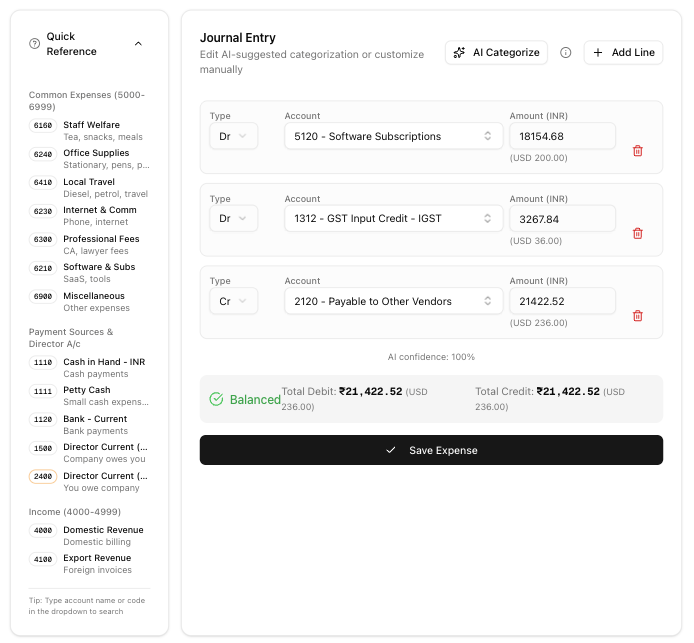
The bill stores a direct reference to its journal entry, so you can always navigate between the two.
Double-entry structure
Bill creation entry
When you save a bill, the journal entry debits expenses and credits liabilities:
Debit:  Expense Account(s)     [Subtotal or full amount]
Debit:  GST Input Credit       [GST amount, if GST-registered]
Credit: Accounts Payable       [Total bill amount in INR]
The system only separates GST Input Credit when your company has a GSTIN registered. Otherwise, the full amount (including GST) goes to the expense account.
Payment entry
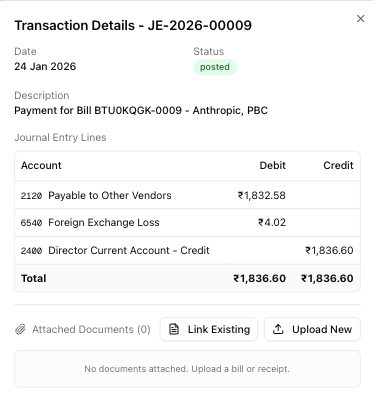
When you record a payment against the bill:
Debit:  Accounts Payable       [Payable amount at original rate]
Credit: Bank Account           [Actual payment amount in INR]
Special scenarios
| Scenario | Entry |
|---|---|
| Forex gain (you paid less than expected) | Credit: Forex Gain account |
| Forex loss (you paid more than expected) | Debit: Forex Loss account |
| TDS deducted by buyer | Credit: TDS Payable account |
The system calculates forex gain or loss as the difference between the bill's original exchange rate and the actual payment rate. It records TDS when the payment includes a TDS deduction amount.
The linking mechanism
The system maintains three links between bills, documents, and journal entries:
- Bill → Journal entry — the bill stores a reference to the journal entry created at save time.
- Document → Journal entry — the uploaded document links to the journal entry, so you can see the source file from the transaction view.
- Payment → Payment journal — each payment stores a reference to its own journal entry that records the bank debit.
The system creates these links in a single step during bill and payment creation. If any part fails, the entire operation rolls back.
Viewing linked entries
From the bill detail view, you can see the linked journal entry reference and navigate directly to the full entry. The journal entry shows all debit and credit lines with account codes, amounts, and narrations.
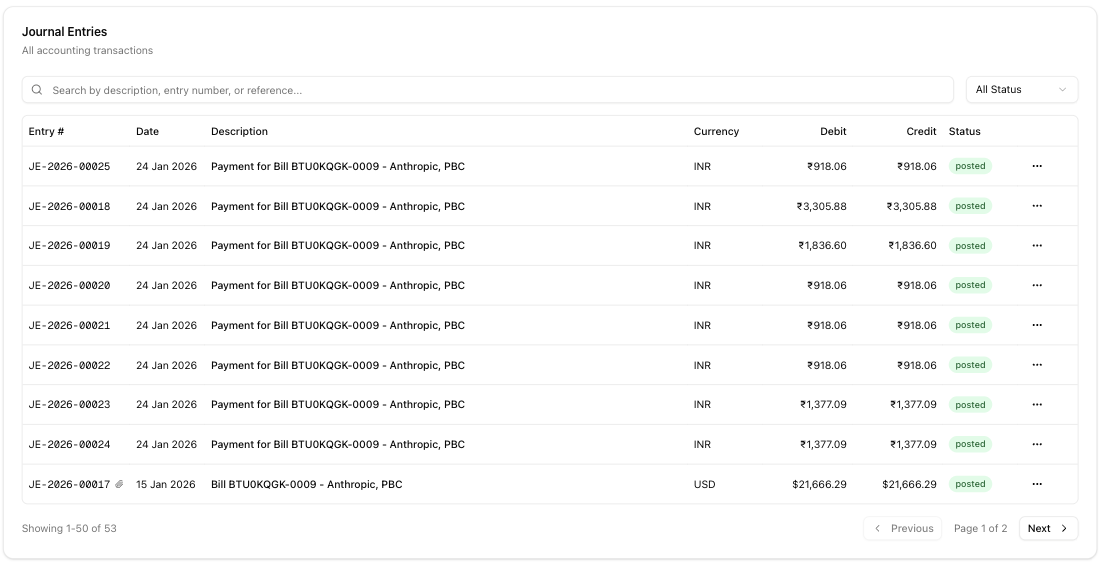
From the journal entry, you can navigate back to the source bill. Payment entries appear separately under the bill's payment history.
Balance validation
Journal entries must balance — total debits must equal total credits. The system uses the Largest Remainder Method to handle rounding, adjusting amounts by at most 1 paisa (₹0.01).
- The system auto-corrects differences of 1 paisa or less during save.
- The system rejects differences greater than ₹1 (100 paisa). You must correct the amounts manually before saving.
- A green checkmark on the Save Expense page confirms the entry is balanced.
Bill cancellation
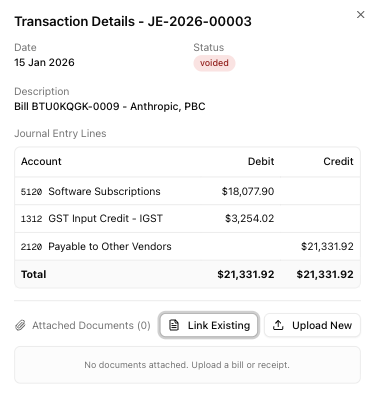
When you cancel a bill, the system voids the linked journal entry. The original entry stays in the ledger for audit purposes — nothing is deleted.
You cannot cancel a bill that has payments. Reverse or delete payments first before cancelling the bill.
For auditors
The linking system provides:
- Full traceability — trace any trial balance figure back through journal entries to source bills and uploaded documents.
- Date alignment — journal entry dates match bill dates. Payment journal entries match payment dates.
- Sequential numbering — journal entries follow the
JE-YYYY-NNNNNformat (e.g.,JE-2026-00042), sequential within each calendar year. - Void history — cancelled bills show their voided journal entries. Voided entries remain in the ledger with a
voidedstatus. - AI transparency — journal entries created through AI categorization are flagged with
ai_categorizedand include anai_confidence_score, so you can distinguish AI-generated entries from manual ones.
Tips
- Record payments through the bill payment feature — this creates proper payment journal entries and maintains the link between bill, payment, and accounting entry.
- Use JE references for reconciliation — the
JE-YYYY-NNNNNnumber appears in reports and can cross-reference bank statements. - Check linked entries for discrepancies — if a bill's amounts don't match the journal entry, navigate to the entry to inspect individual lines.
Related articles
- Save Expense — building journal entries and saving bills
- AI Bill Categorization — uploading bills and extracting data with AI
- Chart of Accounts — setting up the accounts used in journal entries
- Linking Documents — how documents attach to transactions
- Trial Balance — viewing aggregated journal entry totals