GSTR-3B Report
Generate and review your monthly GSTR-3B summary return data for GST filing
GSTR-3B Report
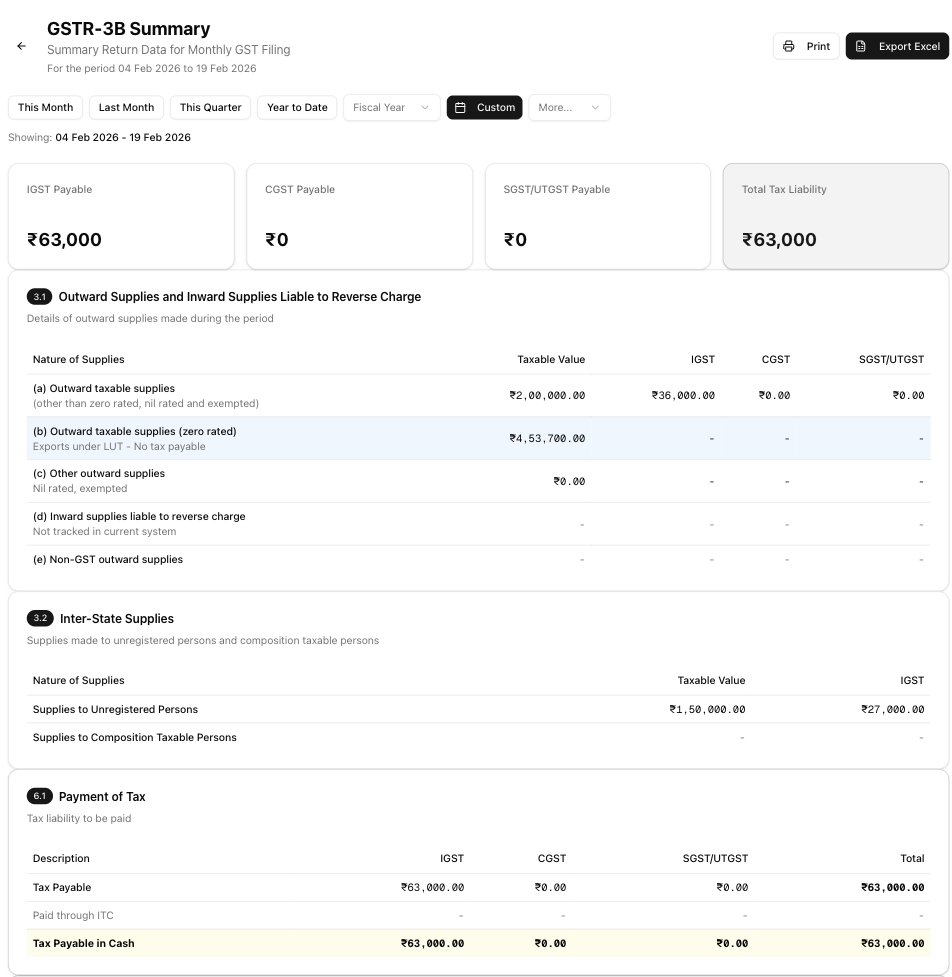
GSTR-3B is a monthly self-declaration summary return that every registered GST taxpayer must file. Unlike GSTR-1 which lists individual invoices, GSTR-3B summarises your total output tax liability, input tax credit claims, and net tax payable into a single consolidated view. The app generates this summary automatically from your invoices so you can review the figures before filing on the GST portal.
How to Generate the Report
- Navigate to Reports from the sidebar.
- Under GST Reports, click GSTR-3B.
- Use the date range picker at the top to select the period. You can choose presets (This Month, Last Month, This Quarter, Year to Date), a custom range, or a different financial year.
- The report generates automatically once a date range is selected — there is no separate "generate" button. If no invoice data exists for the period, you will see a prompt to create an invoice first.
Understanding the Report
Tax Liability Summary Cards
Four cards at the top of the page provide a quick snapshot of your tax liability for the selected period:
- IGST Payable — Integrated GST on inter-state and export supplies.
- CGST Payable — Central GST on intra-state supplies.
- SGST/UTGST Payable — State or Union Territory GST on intra-state supplies.
- Total Tax Liability — The sum of IGST, CGST, and SGST/UTGST. This card is highlighted for quick reference.
Section 3.1 — Outward Supplies and Inward Supplies Liable to Reverse Charge
This table breaks down your outward supplies into five categories. Each row shows the Taxable Value, IGST, CGST, and SGST/UTGST columns:
| Row | Description | Notes |
|---|---|---|
| (a) Outward taxable supplies | Regular taxable supplies other than zero-rated, nil-rated, and exempted | Taxable value and all three tax components are calculated from your invoices |
| (b) Outward taxable supplies (zero rated) | Exports under Letter of Undertaking (LUT) — no tax payable | Highlighted in blue; taxable value is populated but tax columns show "-" because LUT exports carry no GST |
| (c) Other outward supplies | Nil-rated and exempted supplies | Taxable value from invoices; tax columns show "-" |
| (d) Inward supplies liable to reverse charge | Purchases where you must pay GST as the recipient | Currently shows "-" — not tracked in the system |
| (e) Non-GST outward supplies | Supplies that fall outside the scope of GST | Currently shows "-" — not tracked in the system |
Section 3.2 — Inter-State Supplies
This table reports inter-state supplies made to two categories of recipients:
- Supplies to Unregistered Persons — Shows the taxable value and IGST for B2C inter-state transactions.
- Supplies to Composition Taxable Persons — Currently shows "-" as composition dealer tracking is not implemented.
Section 6.1 — Payment of Tax
This table calculates the net tax you need to pay in cash. It has three rows:
| Row | Description |
|---|---|
| Tax Payable | Your total tax liability from the sections above, broken down by IGST, CGST, SGST/UTGST, and Total |
| Paid through ITC | Input Tax Credit utilised against the liability — currently shows "-" because ITC is not tracked in the system |
| Tax Payable in Cash | The net amount to be paid, highlighted in yellow. Since ITC is not tracked, this equals the Tax Payable row — consult your CA for actual ITC adjustments |
Filing Notes
The page displays five important notes:
- Filing deadline — GSTR-3B must be filed by the 20th of the following month.
- Zero-rated exports — Export services under LUT are reported in 3.1(b) as zero-rated supplies with no tax payable.
- Pure export businesses — For LUT-only exporters, tax liability is typically NIL.
- ITC not tracked — Input Tax Credit utilisation is not tracked in this system. Consult your CA for ITC set-off before filing.
- Late payment interest — Interest on late GST payment is charged at 18% p.a. from the due date.
Exporting the Report
If you have the reports export permission, two export options are available from the report header:
- Excel (.xlsx) — Downloads a spreadsheet with all Section 3.1, 3.2, and 6.1 data. Columns: Section, Nature of Supplies, Taxable Value, IGST, CGST, and SGST/UTGST. The filename includes the period (e.g.
GSTR3B_Summary_Jan2026.xlsx). - Print — Opens your browser's print dialog so you can print the report or save it as a PDF using your browser's built-in "Save as PDF" option.
If you do not see the export buttons, ask your team admin to grant you the reports.export permission.
Tips and Best Practices
- Cross-check with GSTR-1. The outward supply totals in Section 3.1 should match your GSTR-1 totals for the same period. Any mismatch indicates missing or duplicate invoices.
- Review before filing. Always review the generated figures against your accounting records before entering them on the GST portal. The report is a summary tool, not a filing tool.
- Export for your records. Download the Excel export each month before filing. This provides an audit trail of the figures you used.
- Consult your CA for ITC. Since input tax credit is not tracked in the system, work with your Chartered Accountant to determine the correct ITC set-off amounts before filing Section 6.1.
- File on time. Late filing attracts interest at 18% p.a. and may result in late fees.
Related Articles
- GSTR-1 Report — Generate invoice-level GSTR-1 data for filing outward supply details.
- GST Overview — Understand how GST works and how the app handles GST calculations.
- Export GST — Learn about GST treatment for export invoices under LUT.
- GST Reconciliation — Reconcile your GST data between returns and books of accounts.
- Date Ranges — Learn about the date picker presets and financial year options available across all reports.