Form 26Q
Generate and file Form 26Q — the quarterly TDS return for non-salary payments — covering contractor, professional, rent, commission, and other deductions
Form 26Q
Form 26Q is the quarterly TDS return you file to report all non-salary TDS deductions. It covers payments to contractors, professionals, landlords, and other vendors where TDS was deducted under sections like 194A, 194C, 194H, 194I, 194J, 194Q, and others.
Table of contents
- What Form 26Q covers
- Filing due dates
- What the return contains
- Generating Form 26Q
- Common validation issues
- How Form 26Q differs from Form 24Q
- Filing status tracking
- Related articles
What Form 26Q covers
Form 26Q reports TDS deducted on non-salary payments to resident deductees. Common sections included:
| Section | Payment type |
|---|---|
| 193 | Interest on securities |
| 194 | Dividends |
| 194A | Interest (other than securities) |
| 194C | Contractor and sub-contractor payments |
| 194D | Insurance commission |
| 194H | Commission or brokerage |
| 194I(a) | Rent of plant, machinery, or equipment |
| 194I(b) | Rent of land, building, or furniture |
| 194J | Professional or technical fees |
| 194K | Income from mutual fund units |
| 194M | Payments by individuals/HUFs to contractors or professionals |
| 194N | Cash withdrawal exceeding prescribed limits |
| 194O | E-commerce operator payments |
| 194Q | Purchase of goods (buyer turnover > ₹10 crore, threshold ₹50 lakh) |
| 194R | Benefits or perquisites in business |
| 194S | Transfer of virtual digital assets |
| 194T | Payments by firms to partners (salary, commission, interest) |
This table lists commonly used sections. For a full list of sections, rates, and thresholds, see TDS sections.
Payments to non-residents are reported separately in Form 27Q (Section 195).
Filing due dates
Form 26Q follows the same quarterly schedule as all TDS returns:
| Quarter | Period | Filing deadline |
|---|---|---|
| Q1 | April – June | 31 July |
| Q2 | July – September | 31 October |
| Q3 | October – December | 31 January |
| Q4 | January – March | 31 May |
Late filing attracts a fee of ₹200 per day (capped at the total TDS amount) under Section 234E.
What the return contains
For each challan in the quarter, Form 26Q reports:
Challan-level details:
- BSR code, deposit date, and challan serial number
- Total TDS deposited, surcharge, and cess
Deductee-level details (under each challan):
| Field | Description |
|---|---|
| PAN | Vendor's Permanent Account Number |
| Vendor name | Name as registered with the income tax department |
| Section code | The TDS section (194C, 194J, 194I, etc.) |
| Date of payment | When the payment was made or credited |
| Amount paid | Gross payment amount |
| TDS rate | Rate applied (including any reduced rate under Section 197) |
| TDS deducted | Tax deducted from the payment |
| TDS deposited | Amount deposited to the government |
| Date of deduction | When TDS was deducted |
| Lower deduction certificate | Whether a Section 197 certificate was applied |
Generating Form 26Q
- Go to TDS > Form 26Q (or Reports > TDS).
- Select the quarter.
- Review the vendor-wise payment details and section-wise breakdown.
Note: To review outstanding TDS amounts before generating, click TDS Payable Summary to see undeposited amounts by quarter.
- Check that all challan details are recorded for the quarter.
- Review validation alerts for errors.
- Click Generate to create the return file.
- Download the file for FVU validation and TRACES upload.
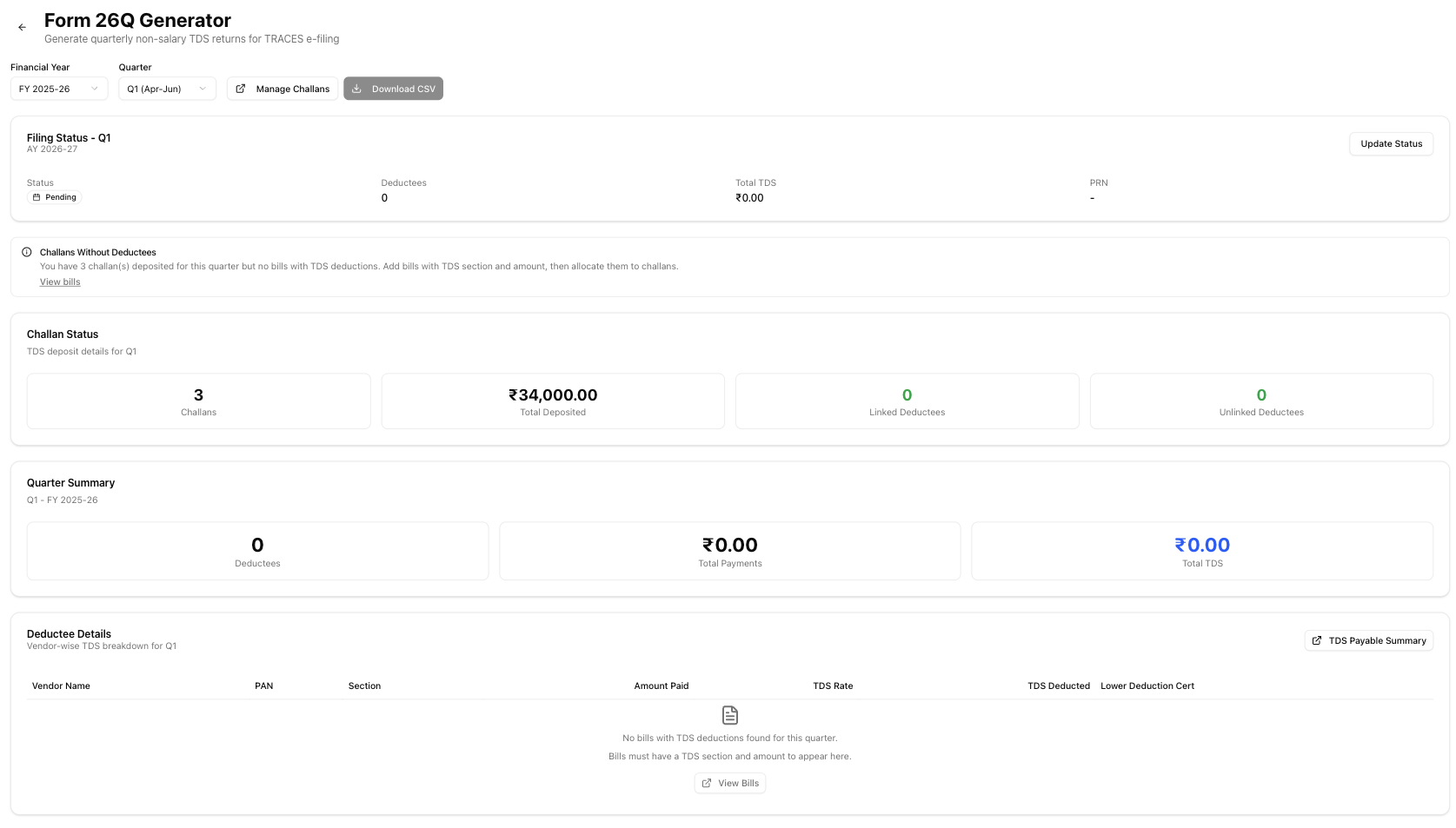
After downloading, validate the file using FVU and upload to TRACES. See TDS returns for the full filing process.
Note: If the deductee table is empty, the Download CSV button is disabled. You need at least one bill with a TDS section and amount in the selected quarter. See common validation issues for details.
Common validation issues
| Issue | Cause | How to fix |
|---|---|---|
| Invalid PAN | Vendor PAN does not match the AAAAA9999A format | Update the vendor's PAN in Vendors > Edit |
| Missing PAN | No PAN on file for the vendor | Add the vendor's PAN; without it, TDS was deducted at 20% |
| Wrong section code | Section assigned to the vendor does not match the payment type | Update the vendor's TDS section in Vendors > Edit > TDS Section |
| Challan mismatch | BSR code, date, or serial number does not match OLTAS records | Verify the challan on the e-Pay Tax portal and correct the recorded details |
| Amount mismatch | Sum of deductee-level TDS does not equal the challan total | Reconcile deductions against the challan deposit amount |
| Missing challan | TDS was deducted but no deposit was recorded | Record the deposit in Reports > TDS > Record. See TDS challans. |
| Threshold error | TDS deducted on a payment below the section's threshold | Review the payment and threshold rules in TDS sections |
| Duplicate records | Same vendor-challan-date combination entered twice | Remove the duplicate deductee entry |
| No deductees found | No bills in the selected quarter have a TDS section and amount | Add bills with TDS deductions in Expenses > Bills, ensure each bill has a TDS section and amount. Then return to Form 26Q. |
| Challans without deductees | Challans were deposited for the quarter but no bills have matching TDS entries | Add the corresponding bills in Expenses > Bills with TDS sections, then allocate them to the existing challans in TDS > Challans |
How Form 26Q differs from Form 24Q
| Feature | Form 24Q (salary) | Form 26Q (non-salary) |
|---|---|---|
| TDS section | Only Section 192 | Multiple sections (194A, 194C, 194H, 194I, 194J, 194O, etc.) |
| Deductee type | Employees | Vendors, contractors, landlords, professionals |
| TDS rate | Slab-based calculation per employee | Fixed rate per section |
| Annexure II | Required in Q4 (full-year salary data) | Not applicable |
| Threshold tracking | Based on cumulative salary | Per-section thresholds (single payment and aggregate) |
| Certificate issued | Form 16 (annual) | Form 16A (quarterly) |
Filing status tracking
Track the filing status for each quarter:
- After uploading to TRACES, update the status in prorganizer.space.
- Record the filing date, PRN, and token number.
- Monitor for acceptance or rejection from CPC-TDS.
| Status | Meaning |
|---|---|
| Pending | Return not yet generated |
| Generated | File created, not yet uploaded |
| Uploaded | File uploaded to TRACES |
| Accepted | Return processed successfully |
| Rejected | Return rejected — review the reason and correct |
After the return is accepted, generate Form 16A certificates for your vendors.
Related articles
- Form 16A — TDS certificates issued to vendors after filing Form 26Q
- TDS sections — section-wise rates and thresholds for non-salary payments
- TDS returns — the complete quarterly return filing process
- TDS challans — deposit details included in the return
- TDS payable summary — Outstanding TDS amounts and deposit tracking
- Form 24Q — the salary TDS return (for comparison)