Add employee
Add employees to your payroll with their personal details, bank information, and statutory registrations
Add employee
Add employees to your payroll with their personal details, bank information, and statutory registrations.
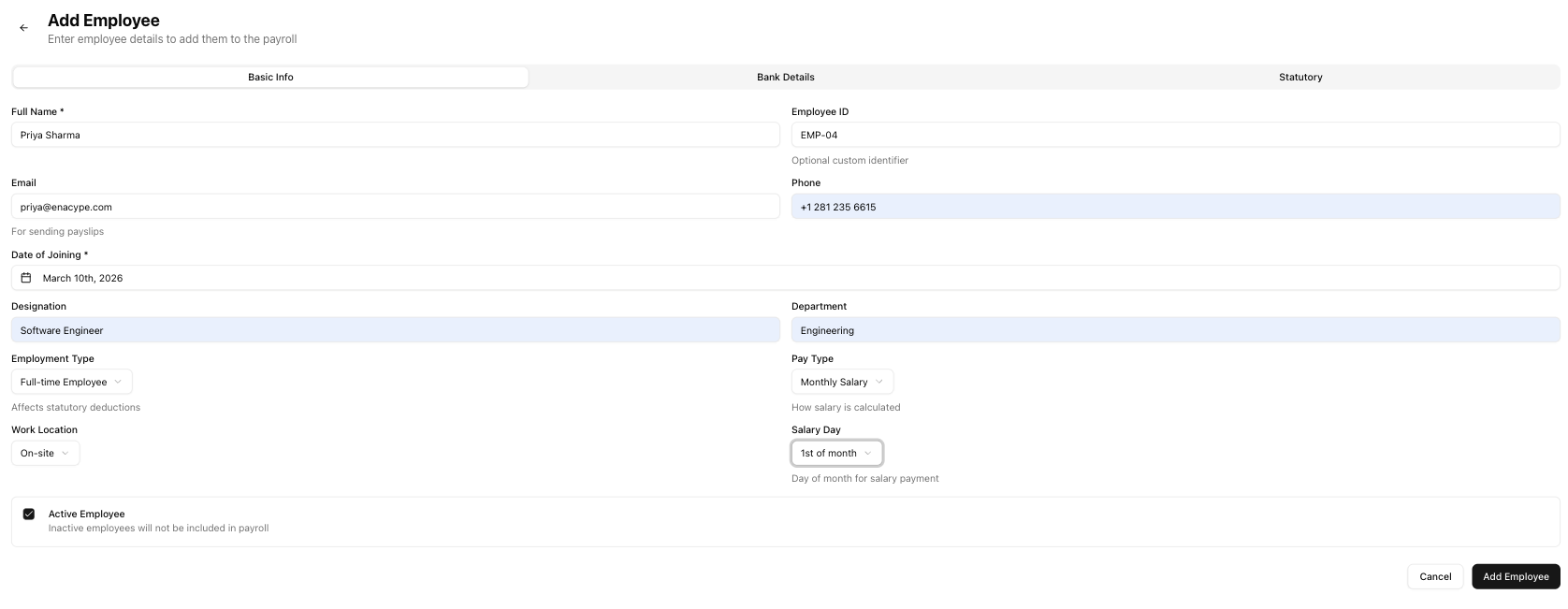
Table of contents
- Before you start
- Adding an employee
- Basic info tab
- Bank details tab
- Statutory tab
- Recording an employee exit
- After adding
- Related articles
Before you start
You need the payroll.manage permission to add employees. If you do not see the Add Employee button, ask your company admin to grant you access.
Adding an employee
- Go to Payroll > Employees.
- Click Add Employee.
- Fill in the form across three tabs — basic info, bank details, and statutory.
- Click Add Employee to save.
Basic info tab
| Field | Required | Description |
|---|---|---|
| Full Name | Yes | Employee's legal name |
| Employee ID | No | Optional internal identifier (e.g., "EMP-001") |
| No | Used for sending payslips | |
| Phone | No | Contact number |
| Date of Joining | Yes | The employee's start date |
| Designation | No | Job title or role |
| Department | No | Department or team |
| Employment Type | Yes | Full-time Employee, Contractor, Hourly Worker, or Daily Worker |
| Pay Type | Yes | Monthly Salary, Hourly Rate, or Daily Rate |
| Work Location | Yes | On-site, Remote, or Hybrid |
| Salary Day | Yes | Day of the month the employee is paid (1st through 28th) |
Bank details tab
All fields on this tab are optional. Fill them in to enable salary disbursement:
| Field | Description |
|---|---|
| Bank Name | Name of the employee's bank |
| Account Number | Bank account number |
| IFSC Code | Indian Financial System Code for the branch |
Statutory tab
Statutory fields are optional but recommended for compliance:
| Field | Format | Used for |
|---|---|---|
| PAN | 10-character uppercase (e.g., ABCDE1234F) | TDS deduction and reporting |
| UAN | 12 digits | Provident Fund contributions |
| ESI Number | ESI registration number | Employee State Insurance (if applicable) |
Recording an employee exit
To mark an employee as having left the company:
- Uncheck the Active Employee toggle on the basic info tab.
- Fill in the fields that appear:
| Field | Description |
|---|---|
| Date of Leaving | Last working date |
| Exit Reason | Select one: resignation, termination, layoff, retirement, absconding, contract end, mutual separation, death |
| Exit Notes | Optional notes about the exit |
- Click Save to update the employee record.
After adding
When you save a new employee:
- The system generates a unique employee code automatically.
- You are redirected to the employee detail page.
- A prompt appears to set up the employee's salary structure.
Note: Employees without a salary structure cannot be included in payroll runs. Set up salary details before running payroll.
Related articles
- Employee detail — View the employee's full profile, salary, and activity history
- Employee list — View and manage all employees from a single page
- Salary structure — Configure salary components, deductions, and net pay
- Run payroll — Process monthly salaries for your employees