Employee detail
View an employee's full profile, salary breakdown, statutory details, bank information, and activity history on a single page
Employee detail
View an employee's full profile, salary breakdown, and activity history on a single page.
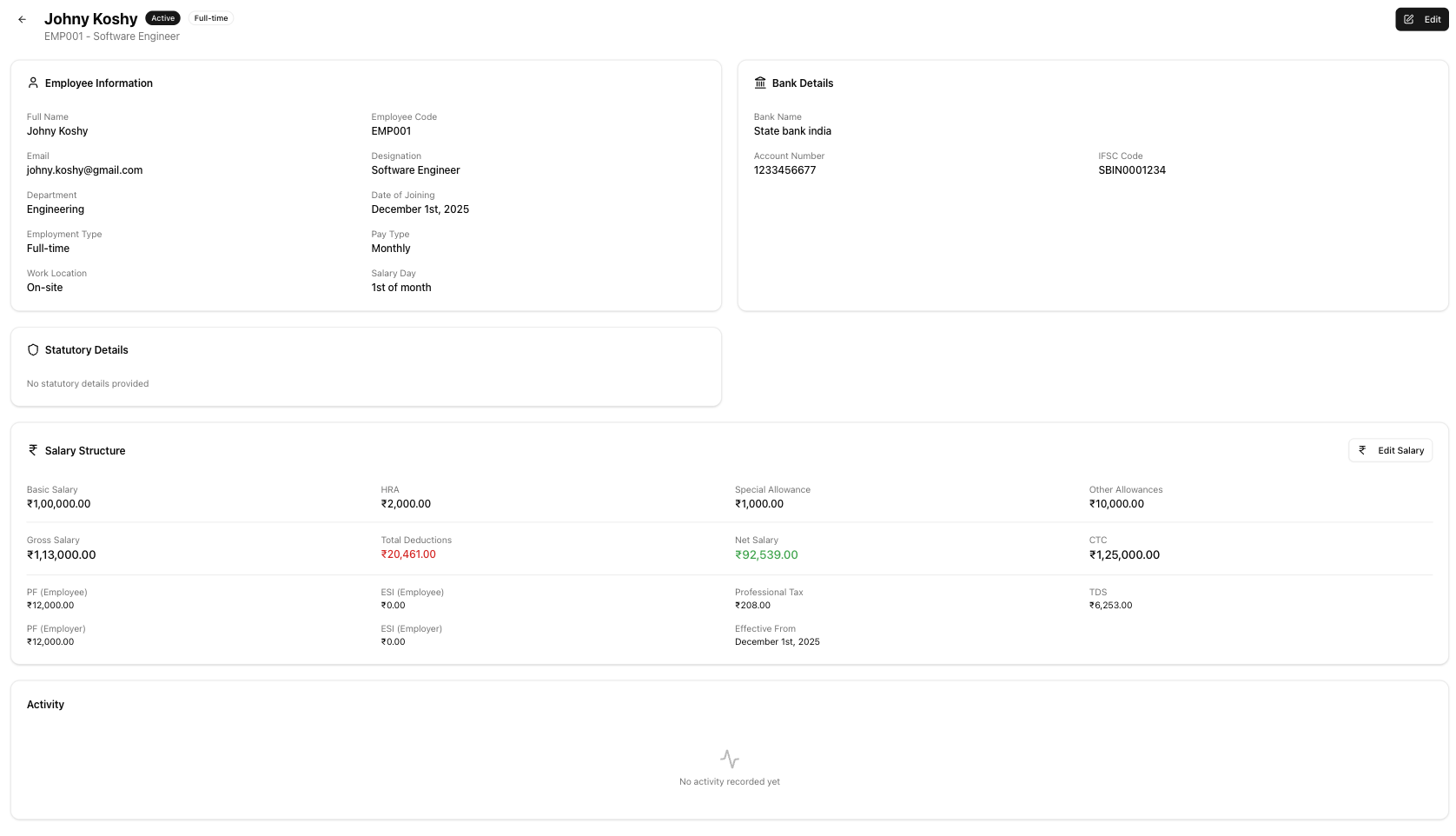
Table of contents
- Header
- Employee information
- Statutory details
- Bank details
- Exit information
- Salary structure
- Activity timeline
- Navigation
- Related articles
Header
The page header shows:
- Employee full name
- Status badge — Active (green) or Inactive (grey)
- Employment type badge — Full-time, Contractor, Hourly, or Daily
- Employee code and designation
- Edit button to update the employee's details
Employee information
A card displaying the employee's core profile fields:
| Field | Description |
|---|---|
| Full Name | Employee's legal name |
| Employee Code | System-generated unique identifier |
| Email address (used for payslips) | |
| Phone | Contact number |
| Designation | Job title |
| Department | Department or team |
| Date of Joining | When the employee started |
| Employment Type | Full-time Employee, Contractor, Hourly Worker, or Daily Worker |
| Pay Type | Monthly Salary, Hourly Rate, or Daily Rate |
| Work Location | On-site, Remote, or Hybrid |
| Salary Day | Day of the month the employee is paid (1st–28th) |
Statutory details
This card appears only when at least one statutory field has data:
| Field | Description |
|---|---|
| PAN | 10-character Permanent Account Number (used for TDS) |
| UAN | 12-digit Universal Account Number (for Provident Fund) |
| ESI Number | Employee State Insurance number (if applicable) |
Bank details
This card appears only when bank information has been provided:
| Field | Description |
|---|---|
| Bank Name | Name of the employee's bank |
| Account Number | Bank account number |
| IFSC Code | Indian Financial System Code for the branch |
Exit information
This card appears only for inactive employees:
| Field | Description |
|---|---|
| Date of Leaving | Last working date |
| Exit Reason | One of: resignation, termination, layoff, retirement, absconding, contract end, mutual separation, death |
| Exit Notes | Free-text notes about the exit |
Salary structure
The salary card has two states:
No salary configured
Displays "No salary structure configured" with the message "Set up a salary structure to include this employee in payroll" and a Set Salary button that opens the salary structure wizard.
Salary configured
Shows a full breakdown of the employee's current salary:
Earnings:
| Component | Description |
|---|---|
| Basic | Base salary |
| HRA | House Rent Allowance |
| Special Allowance | Flexible component |
| Other Allowances | Any additional allowances |
| Gross Salary | Total earnings before deductions |
Deductions:
| Component | Description |
|---|---|
| PF (Employee) | Provident Fund employee contribution |
| ESI (Employee) | Employee State Insurance (if applicable) |
| Professional Tax | State professional tax |
| TDS | Tax Deducted at Source |
| Perquisite Recovery | Recovery for food, accommodation, etc. |
| Total Deductions | Sum of all deductions |
Summary:
| Field | Description |
|---|---|
| Gross Salary | Total earnings before deductions |
| Total Deductions | Sum of all employee deductions |
| Net Salary | In-hand salary (gross minus deductions) |
| PF (Employer) | Employer's Provident Fund contribution |
| ESI (Employer) | Employer's ESI contribution (if applicable) |
| CTC | Cost to Company (gross plus employer contributions) |
| Effective from | Date this salary structure applies from |
| Effective to | End date (blank if current) |
Click Edit Salary to modify the salary structure.
Activity timeline
A chronological history of all changes made to the employee record. Each entry shows the action taken, who performed it, and when. Actions include salary changes, profile updates, status changes, and more.
Navigation
- Back button — returns to the employee list
- Edit — opens the employee edit form
- Set Salary / Edit Salary — opens the salary structure wizard
Related articles
- Employee list — View and manage all employees from a single page
- Add employee — Create a new employee record
- Salary structure — Configure salary components, deductions, and net pay
- Run payroll — Process monthly salaries for your employees