Employee list
View, filter, and manage all employees in your payroll from a single list page
Employee list
View and manage all employees in your payroll from a single list.
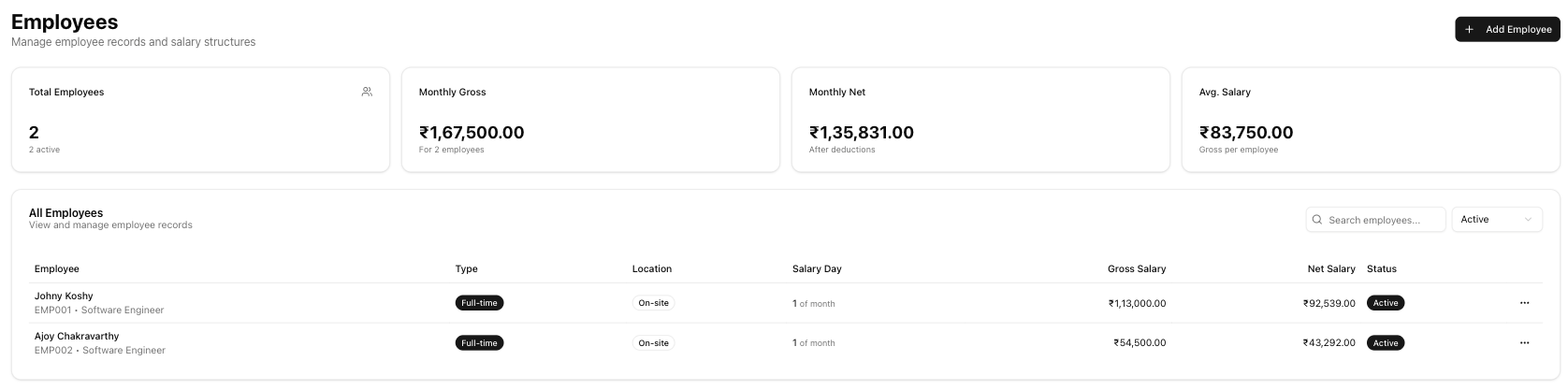
Table of contents
Summary cards
Four cards at the top summarise your workforce:
| Card | What it shows |
|---|---|
| Total Employees | Count of all employees, with the number of active employees shown below |
| Monthly Gross | Combined gross salary across all active employees |
| Monthly Net | Combined net salary (after deductions) across all active employees |
| Avg. Salary | Average gross salary per active employee |
Filters
Use the controls above the table to narrow results:
- Search — type a name, employee code, email, or designation to filter instantly
- Status dropdown — choose All, Active, or Inactive
Employee table
| Column | Description |
|---|---|
| Employee Code | Unique identifier for the employee |
| Employee Name | Full name |
| Designation | Job title or role |
| Department | Department or team |
| Status | Active (green) or Inactive (grey) badge |
| Contact | Email and phone number |
| Gross Salary | Monthly gross salary |
| Net Salary | Monthly net salary (after deductions) |
| Actions | Edit and delete options — see actions menu |
Click any row to open the employee detail page.
Actions menu
Click the actions dropdown on an employee row to access:
| Action | What it does |
|---|---|
| View Details | Opens the employee detail page |
| Edit Details | Opens the employee edit form |
| Set Salary / Edit Salary | Opens the salary structure wizard |
| Delete | Permanently removes the employee record |
Empty state
When no employees match your filters — or you have not added any yet — the page shows a "No employees found" message with a prompt to add your first employee.
Adding an employee
Click the Add Employee button at the top-right to create a new employee record. This button requires the payroll.manage permission.
Related articles
- Add employee — Create a new employee record with personal and statutory details
- Employee detail — View an employee's full profile, salary, and activity history
- Salary structure — Configure salary components, deductions, and net pay
- Run payroll — Process monthly salaries for your employees