TDS overview
Understand how Tax Deducted at Source works — what it is, when you deduct, deposit deadlines, return filing, and how the app automates TDS compliance
TDS overview
Tax Deducted at Source (TDS) requires you to deduct tax when making certain payments and deposit it with the government. The app tracks your TDS deductions, deposits, filings, and certificates in one place.
Table of contents
- What is TDS
- TAN requirement
- When you deduct TDS
- TDS lifecycle
- Monthly deposit deadlines
- Quarterly return filing
- Annual TDS certificates
- TDS Compliance dashboard
- TDS on bills
- Related articles
What is TDS
TDS is a mechanism where the person making a payment (the deductor) deducts tax at a prescribed rate before paying the recipient (the deductee). The deductor deposits this tax to the government on behalf of the deductee. The deductee claims credit for the deducted amount when filing their income tax return.
For example, when you pay a contractor ₹1,00,000 under Section 194C, you deduct 1% (₹1,000) as TDS, pay ₹99,000 to the contractor, and deposit ₹1,000 to the government.
TAN requirement
Every deductor needs a Tax Deduction and Collection Account Number (TAN) — a 10-character alphanumeric identifier issued by the income tax department. You quote your TAN on all TDS challans, returns, and certificates. Apply for TAN using Form 49B on the NSDL-TIN website.
Set your TAN in Settings > Company Details > TAN.
When you deduct TDS
You deduct TDS on these payment types:
| Section | Payment type | Rate | Threshold (FY 2025-26) |
|---|---|---|---|
| 192 | Salary | Income tax slab rates | Basic exemption limit |
| 194A | Interest (other than securities) | 10% | ₹50,000 (banks) / ₹1,00,000 (senior citizens) |
| 194C | Contractor payments | 1% (individual) / 2% (others) | ₹30,000 single / ₹1,00,000 aggregate |
| 194H | Commission or brokerage | 2% | ₹20,000 |
| 194I | Rent | 2% (plant & machinery) / 10% (land & building) | ₹50,000 per month |
| 194J | Professional or technical fees | 2% (technical) / 10% (professional) | ₹50,000 |
| 194Q | Purchase of goods | 0.1% | ₹50,00,000 |
| 195 | Payments to non-residents | Varies by nature and DTAA | No threshold |
See TDS sections for a detailed breakdown of each section, rate, and threshold.
TDS lifecycle
TDS follows four stages from deduction to certificate:
- Deduction — When you record a bill payment with TDS, the app deducts the tax amount and reduces the net payment to the vendor.
- Deposit — You deposit the deducted TDS to the government using a challan (Challan 281). Record the deposit details in TDS challans.
- Filing — File quarterly returns: Form 24Q for salary TDS and Form 26Q for non-salary TDS. These returns report each deduction mapped to its challan.
- Certificates — After filing, generate TDS certificates for your deductees: Form 16 for employees and Form 16A for vendors.
Monthly deposit deadlines
After you deduct TDS, deposit it to the government using Challan 281 by the 7th of the following month. March deductions have an extended deadline.
| Deduction month | Deposit due date |
|---|---|
| April to February | 7th of the next month |
| March | 30th April |
Late deposits attract interest at 1.5% per month from the date of deduction to the date of deposit. See TDS challans for recording and verification steps.
Quarterly return filing
You file TDS returns every quarter to report all deductions and deposits to the income tax department.
| Return form | Covers | Filing deadline |
|---|---|---|
| Form 24Q | Salary TDS (Section 192) | Q1: 31 Jul, Q2: 31 Oct, Q3: 31 Jan, Q4: 31 May |
| Form 26Q | Non-salary TDS (all other sections) | Same as above |
| Form 27Q | Payments to non-residents (Section 195) | Same as above |
Late filing attracts a fee of ₹200 per day (capped at the total TDS amount) under Section 234E. See TDS returns for the filing process.
Annual TDS certificates
After filing returns, you issue TDS certificates to deductees as proof of tax deducted and deposited:
- Form 16 — issued to employees for salary TDS. Deadline: 15th June after the financial year ends. See Form 16 generation.
- Form 16A — issued to vendors and other non-salary deductees. Deadline: within 15 days of filing the quarterly return. See Form 16A.
TDS Compliance dashboard
The main TDS page at Payroll > TDS gives you an overview of your compliance status.
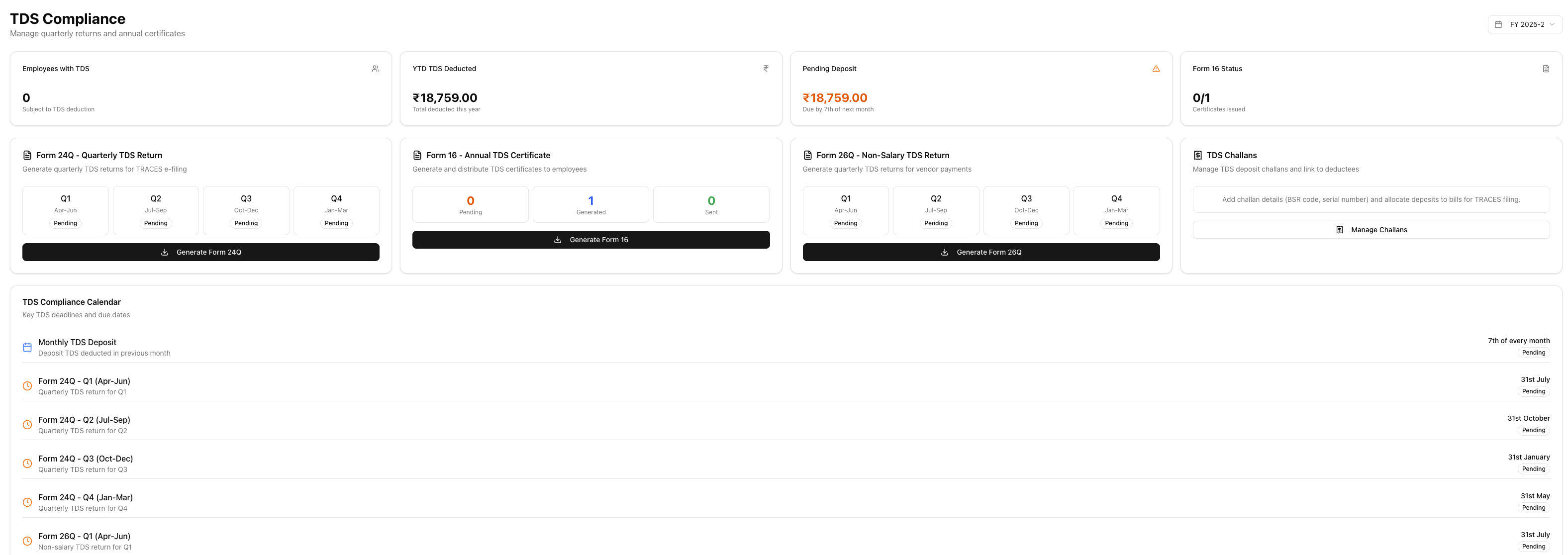
Summary cards show:
| Card | What it shows |
|---|---|
| Employees with TDS | Number of employees with TDS deductions |
| YTD Deducted | Total TDS deducted in the current financial year |
| Pending Deposit | TDS deducted but not yet deposited |
| Form 16 Status | Progress on annual TDS certificates for employees |
Quick-action cards link to:
- Form 24Q — Generate the quarterly salary TDS return
- Form 16 — Issue annual TDS certificates to employees
- Form 26Q — Generate the quarterly non-salary TDS return
- TDS Challans — Manage deposit challans and link to bills
Compliance calendar displays key deadlines for the financial year:
- Monthly deposit due dates (7th of each month)
- Quarterly return filing deadlines
- Certificate issuance deadlines
Use the financial year selector to view compliance data for previous years.
TDS on bills
When a vendor bill has TDS, the bill detail page shows a TDS Information card with:

- Section and rate — the TDS section applied (for example, 194C at 2%)
- TDS amount — total TDS on the bill
- Per-payment breakdown — TDS deducted on each payment recorded against the bill
- Challan allocation status — which challan the TDS is linked to, or a warning if unallocated
- Form 26Q link — click to view the quarterly return that includes this deduction
From the TDS Information card, you can navigate to the TDS payable summary to see all outstanding amounts or to TDS challans to manage deposits.
Related articles
- TDS payable summary — Outstanding TDS amounts and deposit tracking
- TDS challans — Record TDS deposits and allocate to bills
- TDS sections — Section-wise rates, thresholds, and vendor configuration
- TDS calculation — How TDS amounts are calculated
- TDS returns — Quarterly return filing process and corrections
- Form 26Q — Quarterly non-salary TDS return
- Form 24Q — Quarterly salary TDS return
- Form 16 generation — Annual salary TDS certificates for employees
- Form 16A — Quarterly TDS certificates for vendors
- Lower deduction certificates — Handling Section 197 reduced-rate certificates
- Bill payments — Record payments and deduct TDS on vendor bills