Activity log
Track recent actions across your company — who did what, when, and to which record — with filtering by entity type
Activity log
Track recent actions across your company — who did what, when, and to which record.
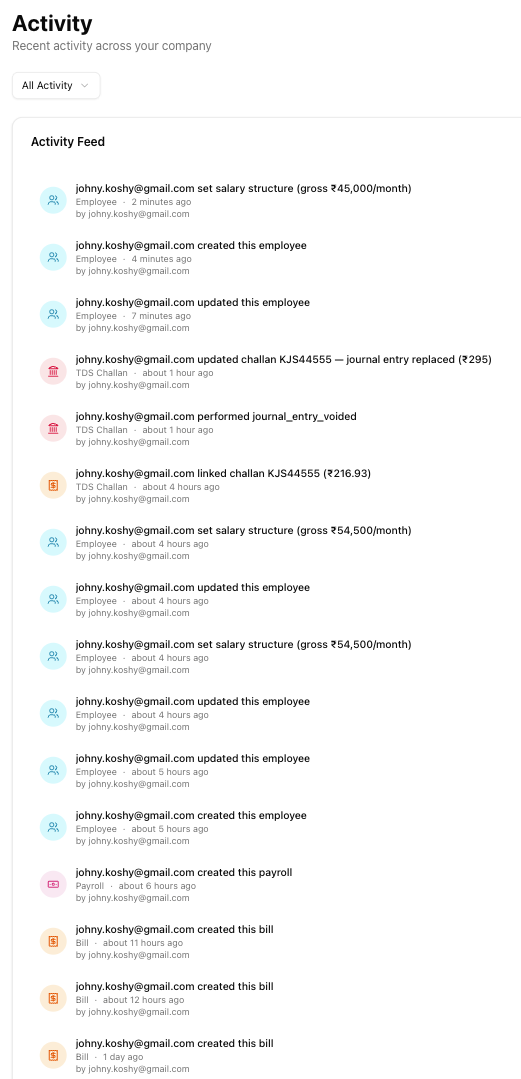
Table of contents
- Accessing the activity page
- Entity type filter
- Activity feed
- Direct links
- Action types tracked
- Per-record timeline
- Empty and loading states
- Related articles
Accessing the activity page
You can reach the activity page in two ways:
- Navigate directly to
/activityin the URL bar. - On the Dashboard, find the Recent Activity widget and click View all.
Entity type filter
Use the dropdown at the top of the page to filter activity by entity type. Options are grouped into three categories:
| Category | Entity types |
|---|---|
| Finance | All Activity, Invoices, Bills & TDS, Transactions, Loans, TDS Challans |
| Payroll | Payroll Runs, Employees |
| Operations | Documents, Team |
Select an entity type to show only activity related to that record type. Choose All Activity to see everything.
Activity feed
Each row in the feed shows:
- Coloured entity icon — identifies the record type at a glance
- Description — what happened (e.g., "Invoice INV-2025-042 was created")
- Entity type badge and relative time (e.g., "Invoice · 2 hours ago")
- Actor email — who performed the action
Click any row to navigate directly to the affected record.
Direct links
When you click an activity row, you are taken to the relevant record:
| Entity type | Destination |
|---|---|
| Invoice | /invoices/{id} |
| Bill | /bills/{id} |
| Loan | /loans/{id} |
| Transaction | /transactions?entry={id} |
| Payroll run | /payroll/{id} |
| Employee | /payroll/employees/{id} |
| TDS deposit | /payroll/tds/challans/{id} |
| Document | /documents |
| Team | /settings/team |
Action types tracked
The activity log captures a wide range of actions across the platform:
General
| Action | Description |
|---|---|
| created | A record was created |
| updated | A record was modified |
| status_changed | A record's status changed |
| deleted | A record was deleted |
| cancelled | A record was cancelled |
| voided | A record was voided |
Financial
| Action | Description |
|---|---|
| payment_recorded | A payment was recorded against a record |
| payment_deleted | A payment was removed |
| reminder_sent | A payment reminder was sent |
| paid | A record was marked as paid |
Documents
| Action | Description |
|---|---|
| document_uploaded | A document was uploaded |
| uploaded | A file was uploaded |
| linked | A document was linked to a record |
| receipt_extracted | Data was extracted from a receipt |
Communication
| Action | Description |
|---|---|
| sent | A record was sent (e.g., invoice emailed) |
| note_added | A note was added |
| note_issued | A credit/debit note was issued |
| note_cancelled | A credit/debit note was cancelled |
| note_deleted | A credit/debit note was deleted |
TDS
| Action | Description |
|---|---|
| challan_linked | A challan was linked to a bill |
| challan_unlinked | A challan was unlinked from a bill |
| challan_cancelled | A challan was cancelled |
| challan_updated | A challan's details were updated |
Loans
| Action | Description |
|---|---|
| loan_cancelled | A loan was cancelled |
| loan_written_off | A loan was written off |
| loan_waived | A loan was waived |
| repayment_voided | A loan repayment was voided |
| dpt3_filed | A DPT-3 filing was recorded |
Payroll
| Action | Description |
|---|---|
| salary_created | A salary structure was created |
| salary_updated | A salary structure was updated |
| salary_deleted | A salary structure was deleted |
Team
| Action | Description |
|---|---|
| member_invited | A team member was invited |
| member_removed | A team member was removed |
| member_suspended | A team member was suspended |
| member_reactivated | A team member was reactivated |
| role_changed | A team member's role was changed |
| invitation_accepted | A team invitation was accepted |
| ai_access_paused | AI access was paused due to subscription expiry |
| ai_access_restored | AI access was restored after subscription renewal |
Note: When a company owner's subscription expires, team member AI access grants are automatically paused. They are restored automatically when the owner renews. See Subscription expiry for details.
Per-record timeline
Individual record detail pages — including invoices, bills, employees, loans, and challans — also show an activity timeline scoped to that specific record. This gives you a focused history without needing to filter the main activity page.
Empty and loading states
When no activity matches the selected filter, the page shows a "No activity found" message with an icon. Change the entity type filter or check that records exist for the selected category.
Related articles
- Audit trails — Settings-based audit log with date range filtering and retention policies
- Navigation guide — Learn how to navigate the platform efficiently